Getting Started with ePAL
Welcome to the ePAL product documentation.
You can use the information here to orientate yourself and to become familiar with ePAL's features and the resources provided to help you understand them. Review the components and deployment options that are explained in this topic to understand what ePAL is and which deployment option might suit you best.
If you would like to see what ePAL looks like in a store, you can try it out at the demo store here.
You can also view videos on our Youtube channel here.
Deployment Options
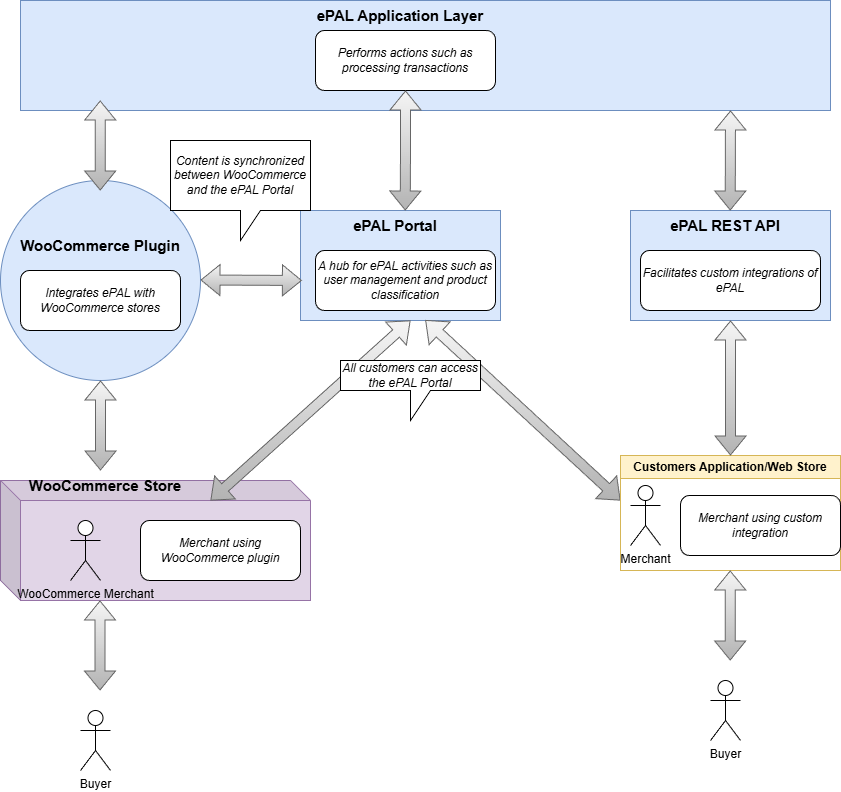
- WooCommerce Plugin: You can use the WooCommerce plugin to integrate ePAL quickly and easily with your WooCommerce store. See Start Here (WooCommerce).
- REST API Integration: Alternativily, you can use the REST API to connect directly to ePAL. See Start Here (API)
Components
- ePAL Portal: ePAL also provides a portal where you can register your profile, view reports and change some settings. The content here and within the plugin can be synchronized so that it remains aligned. See the ePAL Portal User Guide section.
- ePAL WooCommerce Plugin: The plugin integrates the ePAL's functions with WooCommerce. See the ePAL Cross Border Calculator for WooCommerce section.
- REST API: Users who want to connect directly to ePAL can do so using the REST API. See the ePAL REST API Overview section.
These are summarized in the following graphic:
ePAL Portal
You may also utlize the features of the ePAL Portal. You can access if from the following link: ePAL Portal.
Details about how to use the Portal are provided in the ePAL Portal User Guide section.